
The Next.js team at Vercel released the Layouts RFC a few months ago outlining the vision for the future of routing, layouts, and data fetching in the framework. The RFC is detailed and covers both basic and advanced features.
This post will cover the most important features of the upcoming Next.js changes landing in the next major version that you should be aware of.
Copy link to headingCreating Routes
In the new app directory, folders are used to define routes. To create a route, add a page.js file inside a folder. For example, app/page.js:
export default function Page() { return <h1>Hello, Next.js!</h1>}A new Page inside the app directory.
A page (with the page.js naming convention) is UI that is unique to a specific route segment. In this instance, the route segment is / (or the root segment).
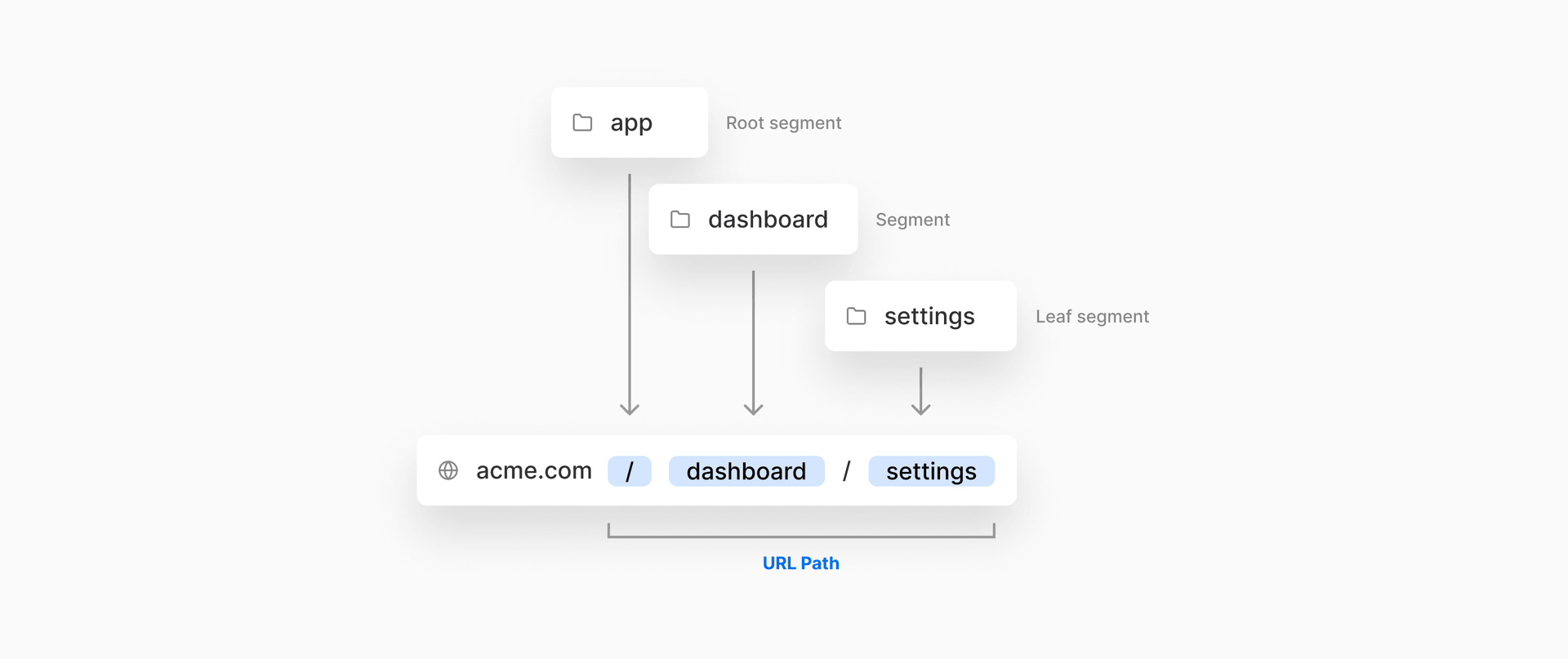
You can incrementally adopt the app directory from the existing pages directory.
Copy link to headingCreating Layouts
You can create nestable layouts that are shared across pages by adding layout.js files.

To make your first layout, you will create a new file app/layout.js.
export default function RootLayout({ children }) { return ( <html> <head> <title>Next.js Layouts RFC in 5 Minutes</title> </head> <body>{children}</body> </html> );}Root layout inside the app directory.
app/page.js above will render as a child of app/layout.js:
<html> <head> <title>Next.js Layouts RFC in 5 Minutes</title> </head> <body> <h1>Hello, Next.js!</h1> </body></html>The rendered HTML output from the root layout and page.
Copy link to headingSharing Layouts
Layouts can be shared across different pages. Every route in app/ shares the same root layout, defined at app/layout.js. For example, if we created a new route segment app/blog/page.js:
export default function BlogPage() { return <h1>Blog Posts</h1>}Blog page inside the app directory.
This page would use the same root layout. app/blog/page.js would render as a child of app/layout.js.
<html> <head> <title>Next.js Layouts RFC in 5 Minutes</title> </head> <body> <h1>Blog Posts</h1> </body></html>The rendered HTML output from the root layout and blog page.
If we wanted a custom layout for this route segment, we would create a new layout at app/blog/layout.js. For example, maybe our blog needs a sidebar navigation layout:
export default function BlogLayout({ children }) { return ( <> <aside> <nav>...</nav> </aside> {children} </> )}
Layout specific to the blog route segment.
app/blog/page.js would render as a child of app/layout.js and app/blog/layout.js:
<html> <head> <title>Next.js Layouts RFC in 5 Minutes</title> </head> <body> <aside> <nav>...</nav> </aside> <h1>Blog Posts</h1> </body></html>The rendered HTML output from the root layout, blog layout, and blog page.
Similarly, if we created a nested dynamic route app/blog/[slug]/page.js for an individual blog post, it would also use the same layouts:
export default function IndividualBlogPost() { return ( <main> <h1>Routing with Next.js</h1> <p>Lorem ipsum dolor sit amet</p> </main> )}Page for a specific blog post, using a dynamic route.
<html> <head> <title>Next.js Layouts RFC in 5 Minutes</title> </head> <body> <aside> <nav>...</nav> </aside> <main> <h1>Routing with Next.js</h1> <p>Lorem ipsum dolor sit amet</p> </main> </body></html>Layout for the individual blog post page with a dynamic route.
Copy link to headingLoading & Error Boundaries
loading.js automatically wraps a page or nested segment in a React Suspense Boundary. Next.js will show your loading component immediately on the first load and again when navigating between sibling routes.
You can use this to create meaningful loading UI for specifics part of your UI.

error.js automatically wraps a page or nested segment in a React Error Boundary. Next.js will show your error component whenever an error in a subtree is caught.

Use this to isolate errors to specific parts of an app, show specific error information, and attempt to recover.
Copy link to headingRoute Groups
Route groups can be used to:
Organize routes without affecting the URL path
Opt a segment out of a layout
Create multiple root layouts for sections of an app with a completely different UI

Copy link to headingSummary
An example app directory using some of the above concepts would look as follows:
Read the full Layouts RFC and stay tuned for more information from the Next.js team at Vercel.