

Last year, we expanded zero-config support for Python and TypeScript backend frameworks. By this summer, developers could deploy their frontend and backend together with Vercel Services and coordinate background work with queues and durable workflows.
Today at Vercel Ship in San Francisco, we are expanding the backend workloads you can run on Vercel. Python on Vercel is now generally available, container support in Vercel Functions enables custom runtimes and system libraries, and we are introducing Vercel Daemons in Public Beta for background workers that pull work and stay running between jobs.
Copy link to headingPython is now generally available
You can build your backend in Python with the Vercel infrastructure and development experience you know from your frontend, including local development, previews, and production deployments. Frameworks such as FastAPI, Flask, and Django run on standard CPython with your PyPI dependencies, while Vercel handles framework detection, builds, and scaling.
Already, 150,000 teams run Python backends on Vercel, including engineers at OpenAI, Polymarket, and Exa.
SDKs for Python let you use Vercel products from your application, whether you’re storing files in Vercel Blob, sending background jobs to Vercel Queues, coordinating durable steps with Vercel Workflows, running untrusted code in Vercel Sandbox, or streaming model responses and handling tool calls with the AI SDK for Python.
Delphi, which builds AI digital minds from books and talks, moved its Python backend from AWS ECS to Vercel. With ten engineers and no dedicated infrastructure role, the team ships to production more than 100 times a day and uses Queues to handle background jobs.
With Vercel, we barely think about infrastructure at all.Spencer SchoebenFounding Engineer at Delphi
Visit the Python knowledge base for framework details and examples.
Copy link to headingApplications in any language with containers
The Vercel container runtime lets you deploy applications written in any language, packaged with the OS libraries and executables they need. Since container support entered Public Beta, 5,000 teams have shipped 150,000 container deployments on Vercel.
Containers deploy as Vercel Functions on Fluid compute, scaling with traffic and using Active CPU pricing, which doesn’t charge for idle time spent waiting for API responses, database queries, or LLM inferencing. Vercel Services lets you develop and deploy your backend alongside your frontend, while Vercel CDN serves traffic on your domains, Vercel WAF protects it, logs help you investigate issues, and rollbacks restore earlier deployments.
For example, take a video app that uses a container for background processing, preparing a playback copy and thumbnail for each uploaded clip. This Dockerfile packages the Python processor, its dependencies, and ffmpeg to run with Daemons:
FROM python:3.12-slimRUN apt-get update \ && apt-get install -y --no-install-recommends ffmpeg \ && rm -rf /var/lib/apt/lists/*WORKDIR /appCOPY requirements.txt .RUN pip install --no-cache-dir -r requirements.txtCOPY processor.py .CMD ["python", "processor.py"]Package the Python video processor and ffmpeg in one image
When you deploy through Git or the Vercel CLI, Vercel builds the image and stores it in your Vercel Container Registry. Read our containerized Functions deployment guide to get started.
Copy link to headingBackground workers with Vercel Daemons
Vercel Daemons lets you deploy containers as continuously running background workers on Fluid compute. You choose the number of instances in each region, and Vercel maintains that capacity by restarting processes when they exit or crash.
Daemons launches with support for pull-based workloads, where your code requests work from another system and processes it as it becomes available. That could mean consuming queue messages or fetching pending jobs from a database.
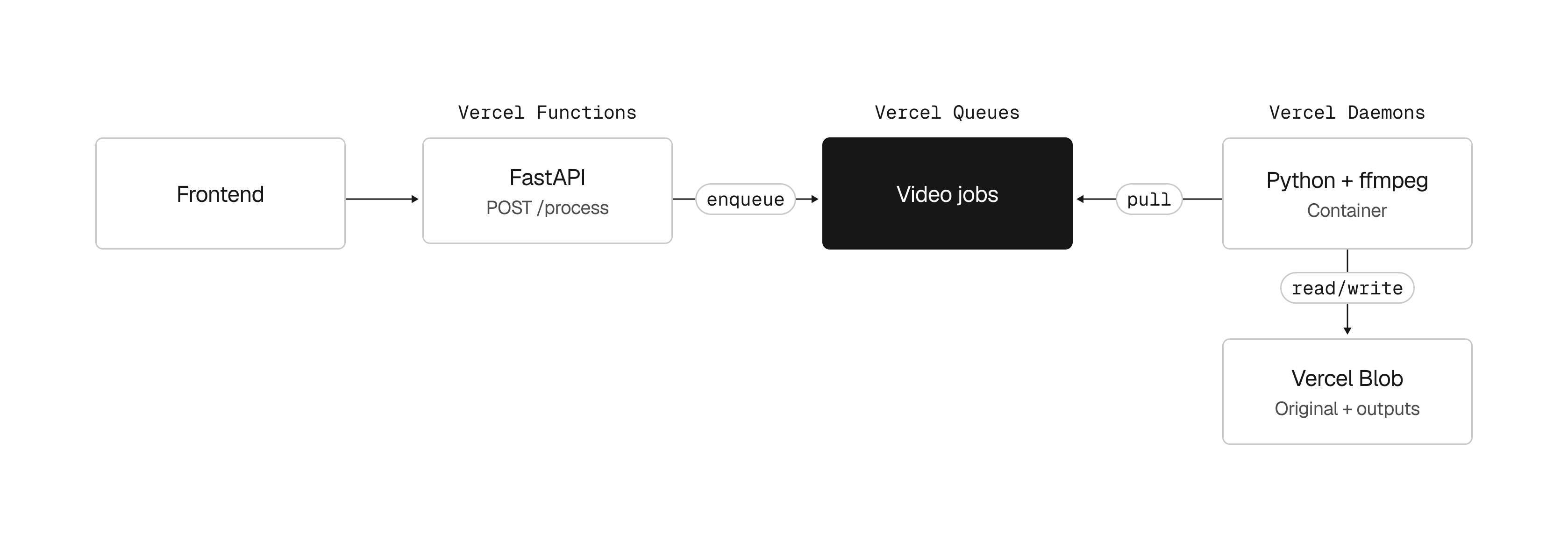
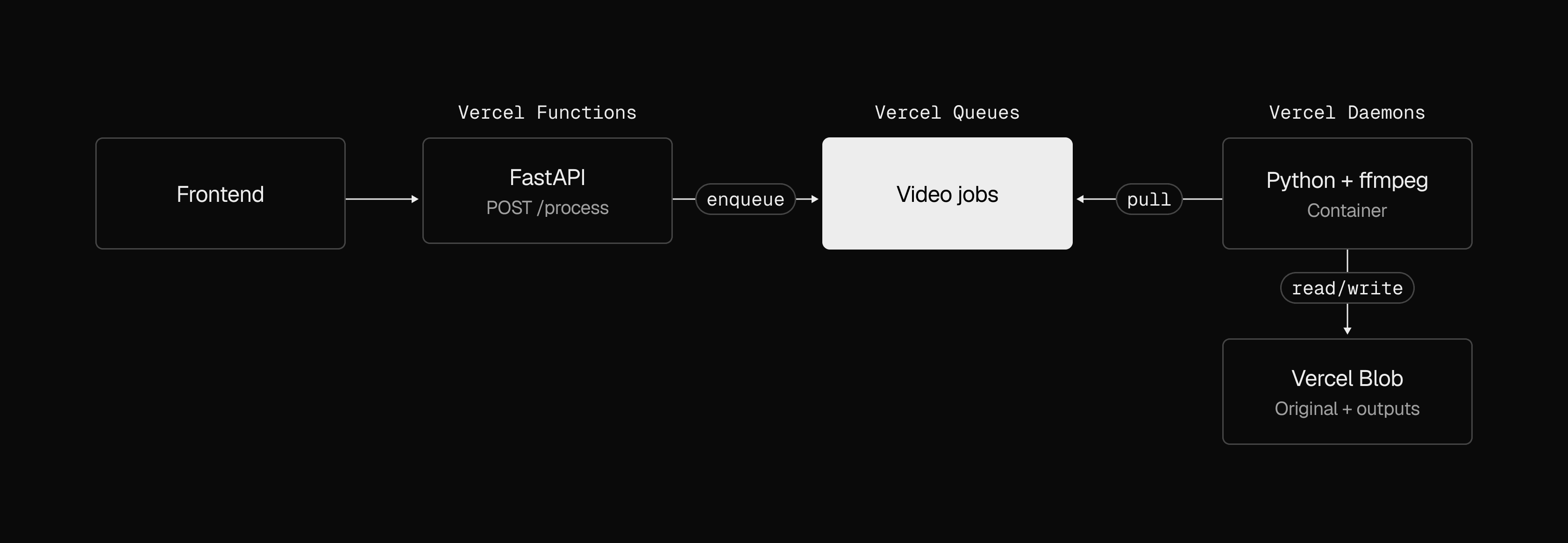
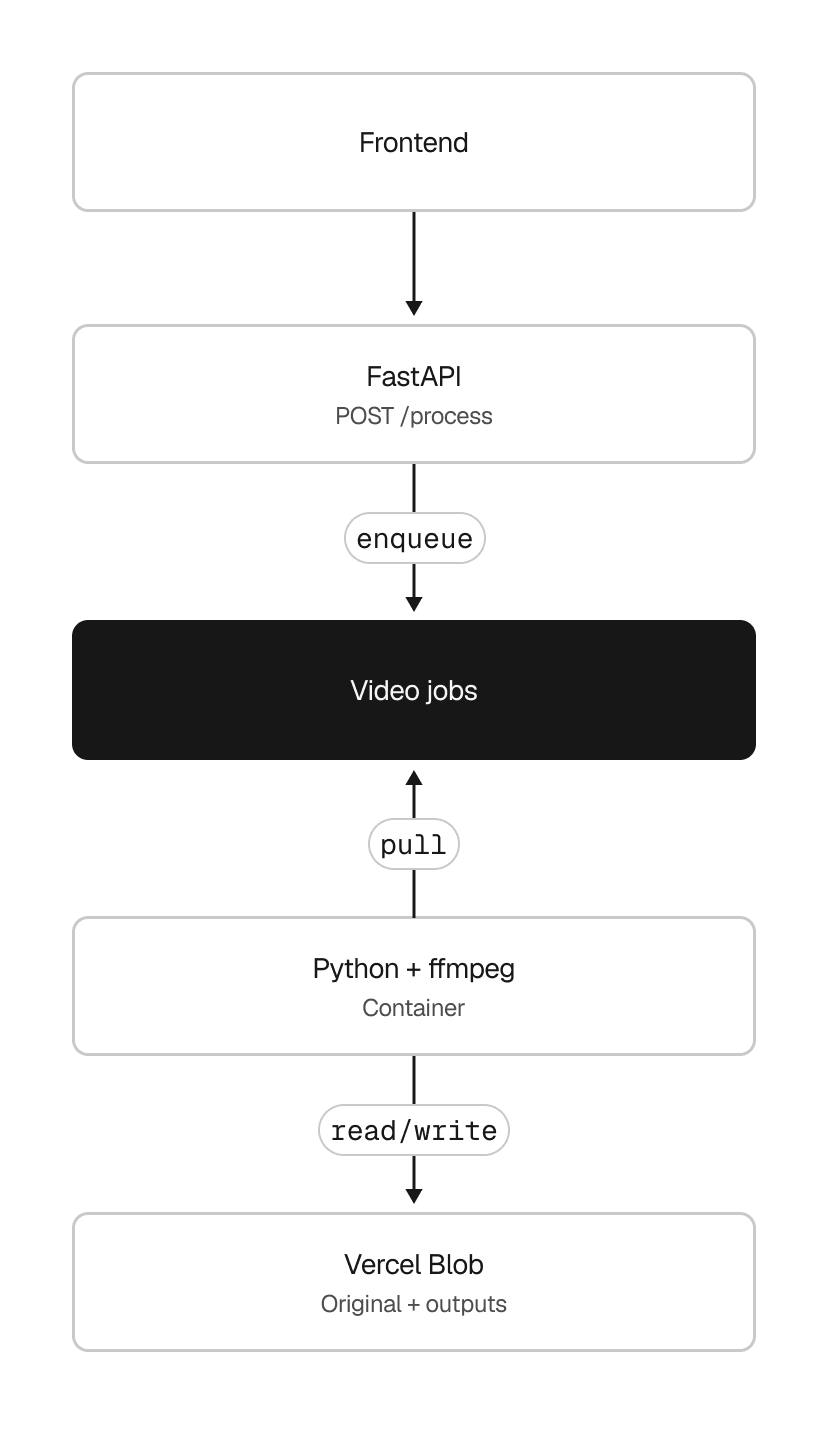
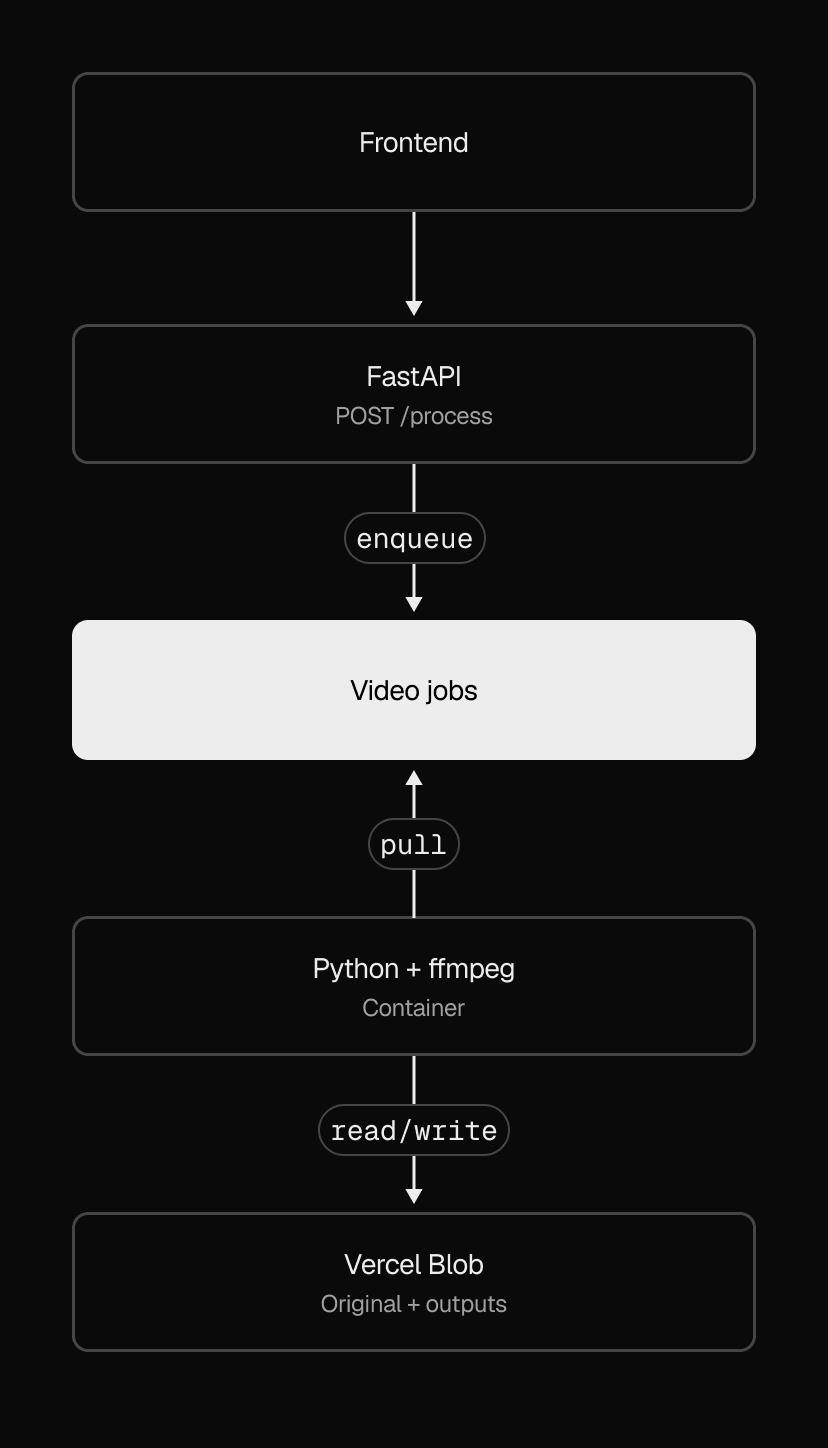
In our example, Daemons runs the video processor continuously as it pulls jobs from Vercel Queues. In vercel.toml, define the Next.js frontend, route requests to it, and add the processor using Dockerfile:
#:schema https://openapi.vercel.sh/vercel.json
[services.frontend]framework = "nextjs"root = "."
[[routes]]src = "/(.*)"destination.service = "frontend"
[daemons.videos]root = "."entrypoint = "Dockerfile"instances.iad1 = 1Keep one video processor instance running in iad1 (Washington, D.C.)
Follow the Daemons deployment guide to add a background worker to your Vercel project.
Copy link to headingRun your backends on Vercel
We’re continuing to invest in backend support so more of your existing application can run on Vercel, using the languages, dependencies, and execution patterns it needs.
Copy link to headingResources
Read our backends guides in the Knowledge Base
Read the complete guide to Vercel Daemons
Deploy an eve agent with Python in one click