
Be flexible. Move fast. Stay secure.
My first week at Vercel coincided with something extraordinary: Vercel Ship 2025.
Vercel Ship 2025 showcased better building blocks for the future of app development. AI has made this more important than ever. Over 1,200 people gathered in NYC for our third annual event, to hear the latest updates in AI, compute, security, and more.

As AI reshapes app development, Vercel Ship highlighted tools, infrastructure, and platform enhancements to help teams stay fast, flexible, and secure. Whether building AI-powered apps or agents, integrating LLMs, or managing high-stakes production traffic, everything focuses on giving you the tools you need to build.
AI is raising expectations around performance, cost, and security. Over the past decade, Vercel defined the Frontend Cloud. Now we're building the next layer with the AI Cloud. Infrastructure designed for agents the same principles that got us here: open source, developer experience, and user experience.
We're building for the AI-native era on Vercel. Here’s how we’re evolving the platform to make that happen.
See all the Ship 2025 announcements
Watch the full keynote to hear all the new features we announced.
Watch the Keynote
Copy link to headingSimplifying model access with AI Gateway
The AI SDK simplifies AI development by unifying interaction patterns and helping developers integrate models without worrying about vendor-specific APIs. Now, we’re going further with AI Gateway.
AI Gateway gives you a single endpoint to access a wide range of AI models across providers, with better uptime, faster responses, and no lock-in. Switch providers with one line of code, route requests intelligently, and set up fallbacks to improve uptime.
Developers can use models from providers like OpenAI, Anthropic, Google, xAI, and more with usage-based billing at provider list prices, Bring-Your-Own-Key support, improved observability (including per-model usage and latency metrics), and simplified authentication.
As newer models are introduced, AI Gateway helps your app stay flexible, without code rewrites or infrastructure changes. But accessing models is only half the equation. Running them efficiently requires a different approach to compute.
Copy link to headingSmarter compute with Fluid and Active CPU pricing
Traditional serverless platforms are not designed to efficiently handle I/O bound workloads like AI inference, agents, and MCP servers. They need to scale instantly, but often remain idle between operations.
Fluid compute breaks away from the one-to-one serverless model. Instead of spinning up separate instances for each invocation, Fluid intelligently orchestrates compute across invocations. Multiple concurrent requests can share the same underlying resources. Teams saw up to 85% cost savings through optimizations like in-function concurrency.
Now, we’re introducing a new pricing model that builds on Fluid: Active CPU.
Active CPU charges for the time your code is actually executing
Provisioned Memory covers the time your function is waiting, charged at 1/11th the rate
Invocations counts per function call (just like in traditional serverless)
If your AI call takes 30s to respond, but only uses 300ms of compute, you only pay for those 300ms. The rest is covered efficiently with Fluid and memory reuse.


Vercel Functions using Fluid compute now have longer execution times, more memory, and more CPU. The default execution time for all projects is now 300s, up from 60s-90s previously.
This is modern compute pricing for the AI era. Fine-grained, usage-based, and optimized for inference. Infrastructure that is ideal for your backend and API code.
Copy link to headingRun untrusted code with Vercel Sandbox
With AI agents generating executable code, you need a way to safely run that code you didn't write, without compromising your infrastructure. That’s why we’re introducing Vercel Sandbox.
Sandbox is an isolated, ephemeral execution environment for untrusted code. It supports Node.js and Python, scales to hundreds of concurrent environments, and lets developers stream logs, install dependencies, and control runtime behavior in a secure container.
These environments are isolated microVMs supporting execution times up to 45 minutes. Sandbox is a standalone SDK that works anywhere, including non-Vercel platforms, and uses Fluid's Active CPU pricing.
We built it for ourselves while working on v0, and now it’s available to you.
import { Sandbox } from "@vercel/sandbox";import { generateText } from 'ai';
const result = await generateText({ model: "anthropic/claude-4-sonnet-20250514", prompt: `Write a Node.js script that prints a Haiku poem to stdout.`, system: ` You are a developer that responds with the content of a single Node.js script. You must include only the code without any markdown, nothing else. Just include Javascript code and no characters before or after the code. `, });
const sandbox = await Sandbox.create();
await sandbox.writeFiles([ { path: "script.js", stream: Buffer.from(result.text) }, ]);
await sandbox.runCommand({ cmd: "node", args: ["script.js"], stdout: process.stdout, stderr: process.stderr, });An example of using Vercel Sandbox to run generated code.
Once you're running code safely, the next challenge is deploying it safely.
Copy link to headingRolling Releases for safer deployments
Speed is more than code or compute performance. It’s about shipping with confidence.
Rolling Releases allow safe, incremental rollouts of new deployments to a subset of users with built-in monitoring, rollout controls, and no custom routing required. If metrics like Time to First Byte (TTFB) degrade or errors spike, the rollout can be paused or aborted entirely.
You configure rollout stages per project and decide how each stage progresses. Updates propagate globally in under 300ms through our fast propagation pipeline. Each rollout includes real-time monitoring to compare error rates and Speed Insights between versions, plus flexible controls via REST API, CLI, dashboard, or Terraform.

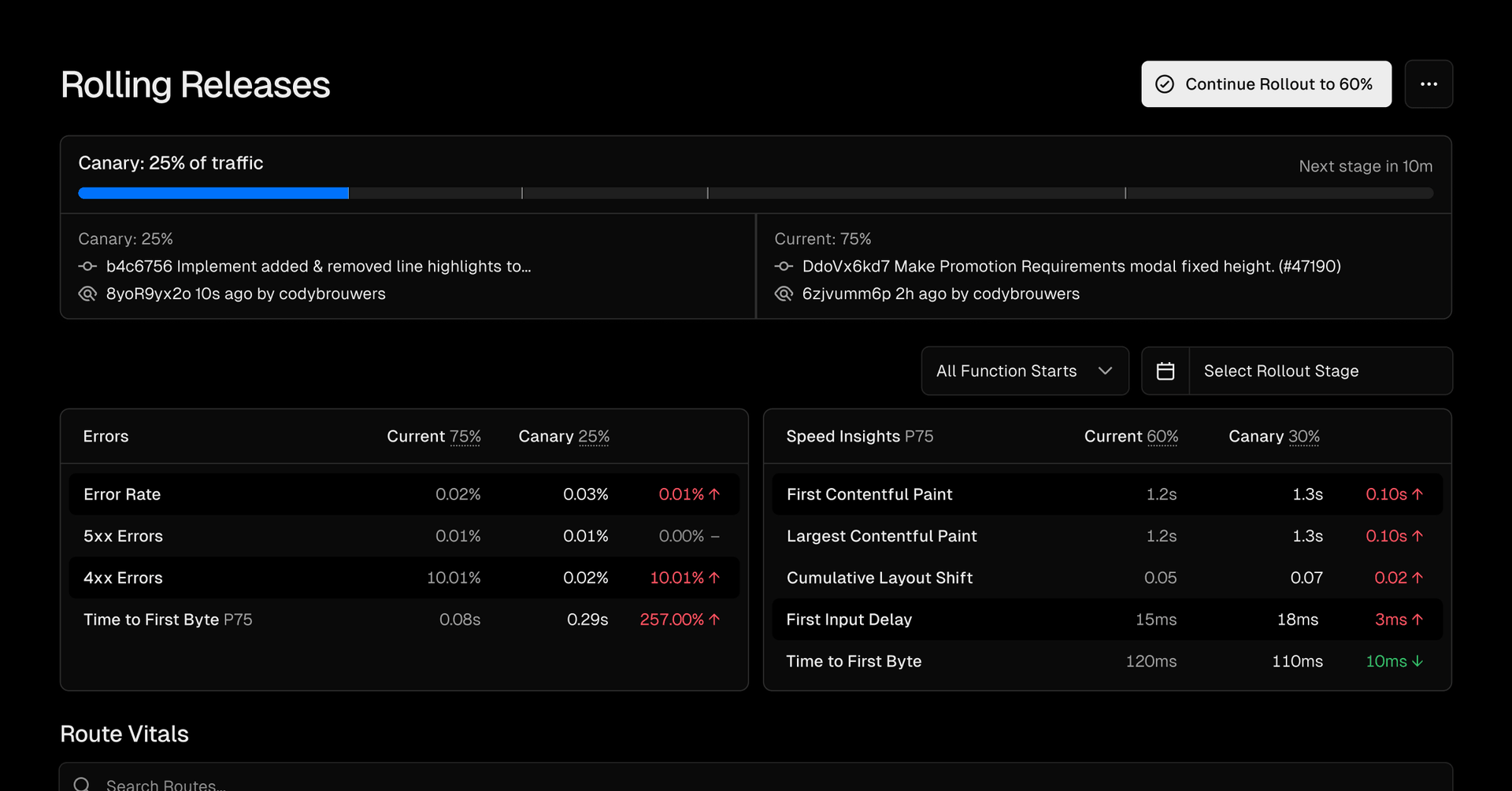
It’s a built-in safety net that keeps your velocity high without increasing your risk. For larger teams managing multiple applications, individual deployment control becomes even more critical.
Copy link to headingMicrofrontends for team autonomy
Larger teams need autonomy as much as speed. Vercel Microfrontends allow you to split large applications into smaller, independently deployable units. Each team can build, test, and deploy using their own tech stack, while Vercel handles integration and routing.
This enables faster development with smaller units that reduce build times. Teams get independent workflows and can migrate incrementally to modernize legacy systems piece by piece. From infrastructure to UI, everything is unified in the Vercel dashboard, giving developers full context, even when working on isolated apps.
As teams ship faster and deploy more frequently, security becomes a top priority.
Copy link to headingInvisible bot detection with BotID
We built our Bot Management suite to defend against all kinds of automated abuse, from noisy scrapers to stealthy credential stuffers. But modern sophisticated bots don't look like bots. They execute JavaScript, solve CAPTCHAs, and navigate browsers like real users. Traditional defenses like checking headers or rate limits sometimes isn't enough.
We’re expanding that coverage with Vercel BotID, built in partnership with Kasada. BotID is an invisible CAPTCHA for protecting critical routes like checkouts, logins, signups, APIs, or actions that trigger expensive backend calls like LLM-powered endpoints.
BotID injects lightweight, obfuscated code that evolves on every load and resists replay, tampering, and static analysis. It performs deep signal analysis behind the scenes without user friction. No more clicking traffic lights.
import { checkBotId } from "botid/server";export async function POST(req: Request) { const { isBot } = await checkBotId();
if (isBot) { return new Response("Access Denied", { status: 403 }); }
const result = await expensiveOrCriticalOperation();
return new Response("Success!");}Setup is simple with no config files or tuning required. Install the package, setup rewrites, mount the client, and verify requests server-side.
BotID traffic appears in the Firewall dashboard with filtering by verdict, user agent, country, and IP address.
Beyond preventing attacks, visibility into your applications becomes important as they grow in complexity. It's a top priority to make BotID available to everyone, even if you don't host on Vercel.
Copy link to headingMeet Vercel Agent: AI that investigates so you don't have to
Vercel Agent is an AI assistant built into the Vercel dashboard that analyzes your app performance and security data.
Agent focuses on Observability. It summarizes anomalies, identifies likely causes, and recommends specific actions. These actions can span across the platform, including managing firewall rules in response to traffic spikes or geographic anomalies, and identifying optimization opportunities within your app.


Copy link to headingOffload work to the background with Vercel Queues
Vercel Queues lets you offload work to the background, allowing slow or long-running jobs to guarantee completion. This means users don't have to wait for slow operations to finish during a request, and your app can handle retries and failures more reliably.
import { send, receive } from "@vercel/queue";await send("topic", { message: "Hello World!" });await receive("topic", "consumer", (m) => { console.log(m.message); // Logs "Hello World!"});An example of sending and receiving message with a queue.
It's good for background jobs like AI video processing, sending emails, or updating external services. It uses an append-only log to store messages and ensures tasks are persisted and never lost.
Copy link to headingThe foundation for AI Cloud development
This is the future of the Vercel platform. It’s already the foundation for some of the most ambitions platforms in production today. It’s not only powering AI apps. It’s also powering the act of building those apps with AI. A platform for both developers and AI agents. It's brings together everything we've built.
The shift from Frontend Cloud to AI Cloud represents more than new features. It's the next evolution toward software that thinks, plans, and adapts. Fast, flexible, and secure by default.
Thanks for joining us at Ship 2025. Stay tuned for recordings of the keynotes, customer panels, sessions, and workshops coming soon. See you next year.
Let us know how we can help
Whether you're starting a migration, need help optimizing, or want to add AI to your apps and workflows, we're here to partner with you.
Contact Us