---
title: "OpenAI Assistants Quickstart"
description: "A quick-start template using the OpenAI Assistants API with Next.js built by OpenAI"
url: "https://vercel.com/templates/next.js/openai-assistants-quickstart"
links:
repository: "https://github.com/openai/openai-assistants-quickstart"
demo: "https://platform.openai.com/docs/assistants"
deploy: "https://vercel.com/new/clone?demo-title=OpenAI+Assistants+Quickstart&demo-description=A+quick-start+template+using+the+OpenAI+Assistants+API+with+Next.js+built+by+OpenAI&demo-url=https%3A%2F%2Fplatform.openai.com%2Fdocs%2Fassistants&demo-image=%2F%2Fimages.ctfassets.net%2Fe5382hct74si%2F5IAtnPpxikPr4Nfo6TlopI%2F18541024ae295b69101a025c9867d169%2F327278336-755e85e9-3ea4-421f-b202-3b0c435ea270.png&project-name=OpenAI+Assistants+Quickstart&repository-name=openai-assistants-quickstart&repository-url=https%3A%2F%2Fgithub.com%2Fopenai%2Fopenai-assistants-quickstart&from=templates&skippable-integrations=1&env=OPENAI_API_KEY&envDescription=Go+here+to+get+required+API+Keys&envLink=https%3A%2F%2Fgithub.com%2Fopenai%2Fopenai-assistants-quickstart%2Fblob%2Fmain%2F.env.example"
---
# OpenAI Assistants Quickstart
A quick-start template using the OpenAI Assistants API with Next.js built by OpenAI
# OpenAI Assistants API Quickstart
A quick-start template using the OpenAI [Assistants API](https://platform.openai.com/docs/assistants/overview) with [Next.js](https://nextjs.org/docs).
## Quickstart Setup
### 1. Clone repo
```shell
git clone https://github.com/openai/openai-assistants-quickstart.git
cd openai-assistants-quickstart
```
### 2. Set your [OpenAI API key](https://platform.openai.com/api-keys)
```shell
export OPENAI_API_KEY="sk_..."
```
(or in `.env.example` and rename it to `.env`).
### 3. Install dependencies
```shell
npm install
```
### 4. Run
```shell
npm run dev
```
### 5. Navigate to [http://localhost:3000](http://localhost:3000).
## Deployment
You can deploy this project to Vercel or any other platform that supports Next.js.
[](https://vercel.com/new/clone?repository-url=https%3A%2F%2Fgithub.com%2Fopenai%2Fopenai-assistants-quickstart&env=OPENAI_API_KEY,OPENAI_ASSISTANT_ID&envDescription=API%20Keys%20and%20Instructions&envLink=https%3A%2F%2Fgithub.com%2Fopenai%2Fopenai-assistants-quickstart%2Fblob%2Fmain%2F.env.example)
## Overview
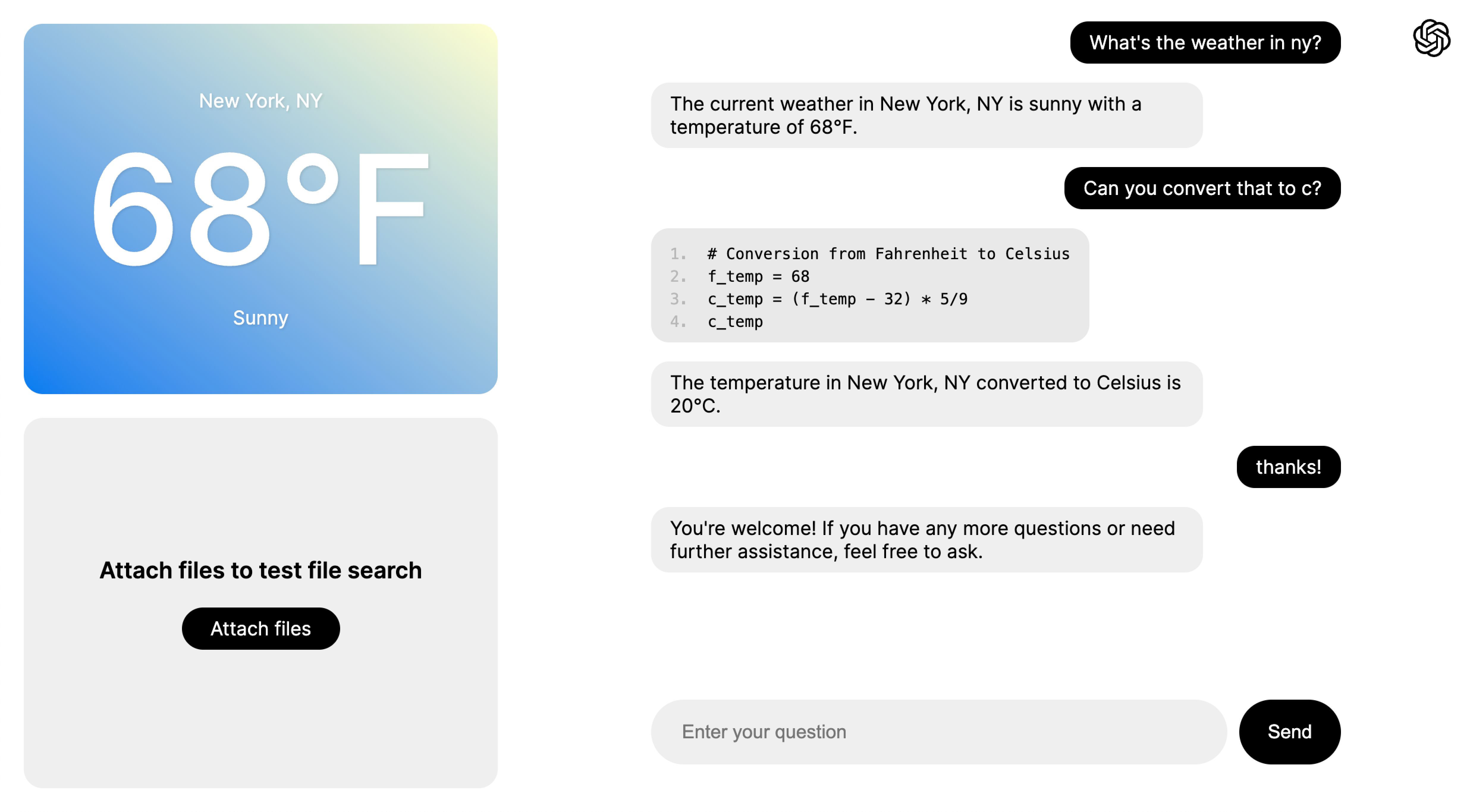
This project is intended to serve as a template for using the Assistants API in Next.js with [streaming](https://platform.openai.com/docs/assistants/overview/step-4-create-a-run), tool use ([code interpreter](https://platform.openai.com/docs/assistants/tools/code-interpreter) and [file search](https://platform.openai.com/docs/assistants/tools/file-search)), and [function calling](https://platform.openai.com/docs/assistants/tools/function-calling). While there are multiple pages to demonstrate each of these capabilities, they all use the same underlying assistant with all capabilities enabled.
The main logic for chat will be found in the `Chat` component in `app/components/chat.tsx`, and the handlers starting with `api/assistants/threads` (found in `api/assistants/threads/...`). Feel free to start your own project and copy some of this logic in! The `Chat` component itself can be copied and used directly, provided you copy the styling from `app/components/chat.module.css` as well.
### Pages
- Basic Chat Example: [http://localhost:3000/examples/basic-chat](http://localhost:3000/examples/basic-chat)
- Function Calling Example: [http://localhost:3000/examples/function-calling](http://localhost:3000/examples/function-calling)
- File Search Example: [http://localhost:3000/examples/file-search](http://localhost:3000/examples/file-search)
- Full-featured Example: [http://localhost:3000/examples/all](http://localhost:3000/examples/all)
### Main Components
- `app/components/chat.tsx` - handles chat rendering, [streaming](https://platform.openai.com/docs/assistants/overview?context=with-streaming), and [function call](https://platform.openai.com/docs/assistants/tools/function-calling/quickstart?context=streaming&lang=node.js) forwarding
- `app/components/file-viewer.tsx` - handles uploading, fetching, and deleting files for [file search](https://platform.openai.com/docs/assistants/tools/file-search)
### Endpoints
- `api/assistants` - `POST`: create assistant (only used at startup)
- `api/assistants/threads` - `POST`: create new thread
- `api/assistants/threads/[threadId]/messages` - `POST`: send message to assistant
- `api/assistants/threads/[threadId]/actions` - `POST`: inform assistant of the result of a function it decided to call
- `api/assistants/files` - `GET`/`POST`/`DELETE`: fetch, upload, and delete assistant files for file search
## Feedback
Let us know if you have any thoughts, questions, or feedback in [this form](https://docs.google.com/forms/d/e/1FAIpQLScn_RSBryMXCZjCyWV4_ebctksVvQYWkrq90iN21l1HLv3kPg/viewform?usp=sf_link)!
## Related Templates
### [Morphic: AI-powered answer engine](https://vercel.com/templates/next.js/morphic-ai-answer-engine-generative-ui)
AI answer engine with Generative UI.
### [Upstash Vector + Vercel AI SDK Starter](https://vercel.com/templates/next.js/upstash-vector-vercel-ai-sdk-starter)
A RAG chatbot starter for expert answers on university degrees. Built using Vercel AI SDK, LangChain, Upstash Vector, and OpenAI.
### [Chatbot](https://vercel.com/templates/next.js/chatbot)
A full-featured, hackable Next.js AI chatbot built by Vercel
---
## Additional documentation
The [Vercel Knowledge Base](https://vercel.com/kb) contains guides and answers to common questions about Vercel, including deployment, framework configuration, domains, caching, and troubleshooting.