

Black Friday and Cyber Monday push commerce apps into traffic patterns they don’t hit the rest of the year. That traffic comes from people browsing on their phones, AI assistants shopping on someone’s behalf, crawlers indexing your catalog, and bots trying to abuse your store. Each needs different handling.
This guide covers how to understand your traffic, reduce backend load, and test the full purchase journey. For monitoring, bot policies, spend controls, and recovery, see How to keep your storefront running through Black Friday.
Copy link to headingStart with traffic patterns and performance baselines
Review last year's Black Friday, or the closest comparable event, to prioritize fixes. Look beyond the homepage to product pages, search, cart, checkout, promotions, and limited-stock drops. Identify:
- Where traffic concentrated and customers abandoned purchases.
- Where latency and errors rose.
- Which routes, functions, and third-party services did the most backend work.
Record normal traffic and performance, including the share from shoppers, assistants, and crawlers. This baseline helps distinguish a successful campaign from a slowdown or attack during Black Friday.
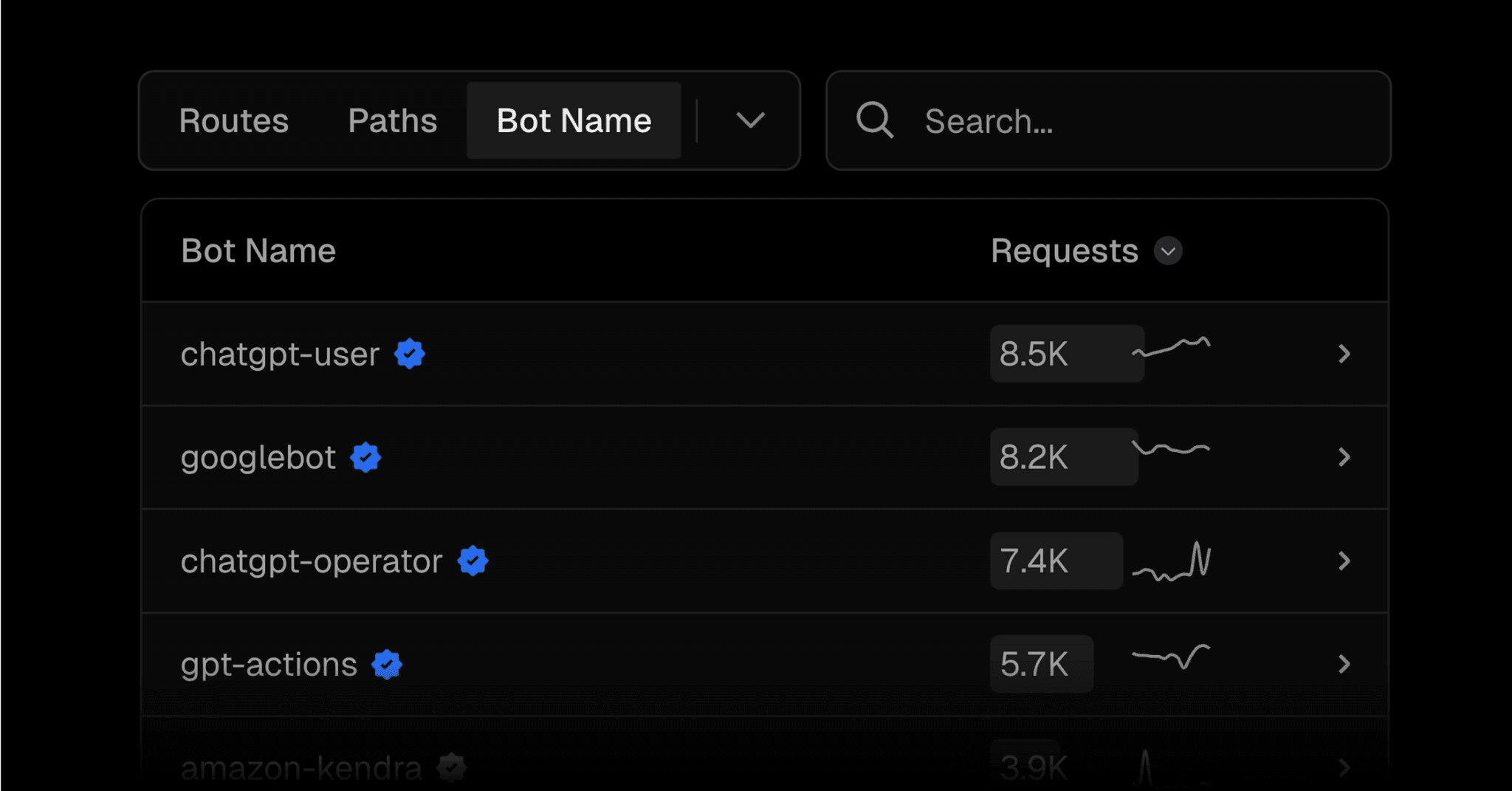
Web Analytics shows traffic patterns, Speed Insights shows real-user performance, and Observability shows the function, external API, or log behind a slow route. Web Analytics excludes bots, so use Observability Plus to query traffic by bot name, category, and verification status. Log AI bot activity before you change your bot policies, so you have something to compare against.
If you're not sure where to start, ask Vercel Agent (in public beta) from your dashboard. It draws on your projects' logs, metrics, configuration, usage, deployments, and connected repositories. Ask which routes had the most errors or the slowest responses this month, or what to review in your caching and function setup before Black Friday.
Copy link to headingSet performance and checkout targets
Define readiness targets for the highest traffic you expect this year. Add headroom based on your forecast, architecture, and provider limits. Agree on the targets with the people responsible for revenue and customer experience, and give each target an owner:
| Criterion | What to define |
|---|---|
| Latency | An acceptable response time for each critical route: product, search, cart, checkout |
| Errors | The maximum acceptable error rate for each critical route and dependency |
| Purchase completion | The share of started checkouts that should complete, compared with your baseline |
| Order correctness | No lost or duplicate orders, and every order matches its payment, price, and inventory |
Load tests are measured against these criteria, and the companion guide's alert thresholds start from them.
Copy link to headingReduce backend load before peak traffic
Every cached request is one your backend never handles: during BFCM 2025, Vercel's global cache served more than 56.9 billion requests. The bottleneck is often upstream, in a database, CMS, search API, or inventory service that gets more requests than it can handle.
Copy link to headingChoose rendering and freshness requirements by page type
| Page type | Caching approach |
|---|---|
| Product and category pages | Cache and regenerate as the catalog changes. |
| Search | Cache only where freshness and personalization requirements allow. |
| Cart and checkout | Use current, customer-specific data. |
Never put private cart, authentication, or preview data in a shared cache. If product details load only after JavaScript runs, the cache holds an empty shell and every shopper still hits your APIs. Limit cache keys to inputs that change the response, so an unrelated cookie or flag doesn't split or bypass the cache.
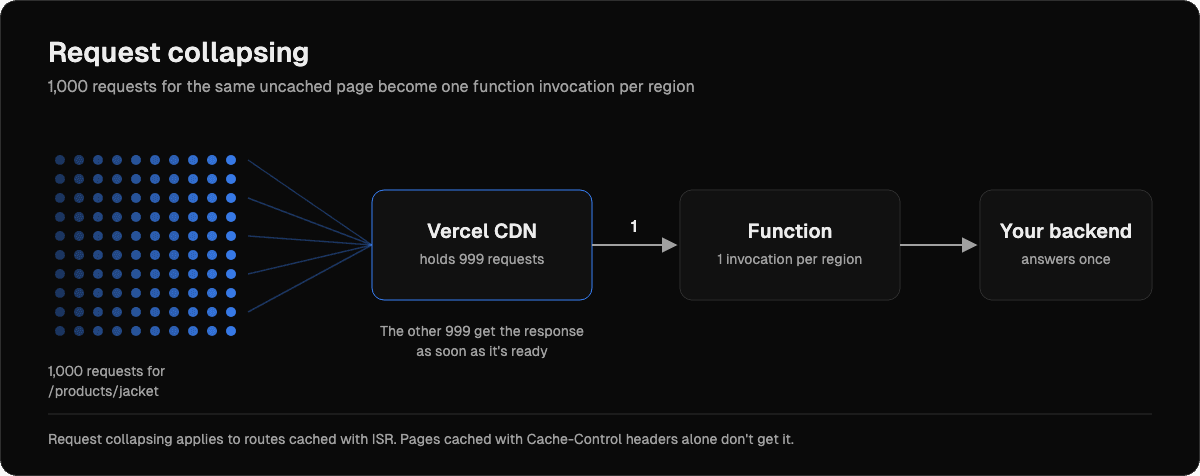
Incremental Static Regeneration (ISR) caches pages and refreshes them without a deployment. Request collapsing combines simultaneous requests for an uncached path into one function invocation per region. Pages cached only with Cache-Control headers don't get this protection. Vercel doesn't know they are cacheable until it receives the first response.
In Next.js 16, revalidateTag(tag, 'max') serves cached data while fresh data loads; use immediate expiry when the next response must show the update. Always check price and inventory against your commerce system at purchase. The Runtime Cache keeps repeated data fetches close to your functions, resulting in faster responses.
Copy link to headingCheck capacity and data locality
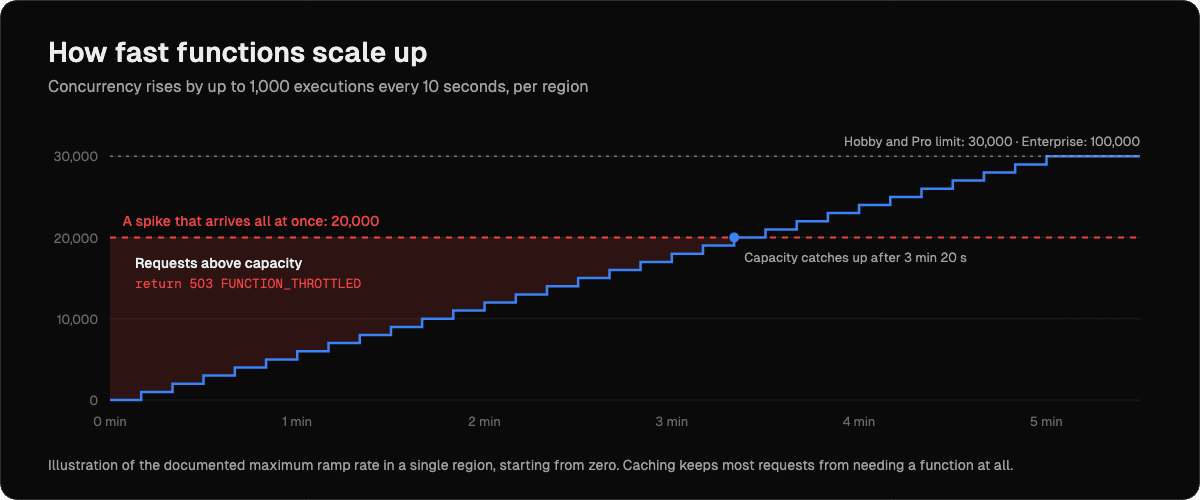
Vercel Functions handle uncached requests and scale by up to 1,000 concurrent executions every 10 seconds per region. The maximum is 30,000 on Hobby and Pro or 100,000 on Enterprise. Requests that exceed available concurrency can receive 503 FUNCTION_THROTTLED. Scaling up to handle a large spike can take several minutes, so caching reduces the load your functions need to handle.
Run functions near your database, review connection pooling, and confirm your third-party rate limits, since scaling your storefront won’t raise them.
Pro teams can run functions in up to five regions, and Enterprise teams can add failover regions; check that dependencies stay reachable on failover. After a mid-sale deployment, runtime-generated ISR pages start uncached, so their first requests go back to upstream services. Allow for this additional backend load in your capacity plan; see cache behavior during a release.
To learn more, see Caching audits: Five antipatterns that cost you performance and money, Rendering strategies for retail: ISR vs SSR vs static, and How to handle order-ahead traffic spikes on Vercel.
Copy link to headingMake product information accessible to shoppers and agents
In Vercel and MERJ's December 2024 study, ChatGPT and Claude crawlers downloaded JavaScript but didn't execute it. Put the product's name, price, availability, seller, and structured data such as JSON-LD in the initial HTML. Keep the page, structured data, feed, and checkout consistent, since a mismatch can affect merchant listing eligibility. Use the same catalog event to trigger feed refreshes and revalidation. Monitor both processes to confirm they finish, since a shared trigger doesn't guarantee that both will complete.
To check, fetch a page without running JavaScript:
Check product.html for the name, price, availability, seller, and application/ld+json markup, and validate it across variants and promotions. Confirm supported agents can reach these pages through your firewall rules.
See the full checklist in Making your catalog discoverable to AI agents.
Copy link to headingMake order processing durable
Keep non-critical work out of the checkout response. Save the order, or hand it to a durable queue, before you confirm receipt. Then move confirmation emails, fulfillment dispatch, and analytics into background processing. Make each consumer idempotent, so handling a message twice never charges a customer or ships an order twice.
Vercel Queues, in beta on all plans, gives you durable messages, automatic retries, and idempotency keys that drop duplicate publishes. Queues deliver each message at least once, so your consumers still need their own guards against duplicate side effects.
Don't rely on waitUntil() or Next.js after() alone for critical work. Both are bound by the function's lifetime and don't retry. How to handle order-ahead traffic spikes on Vercel explains when to use a queue instead.
Copy link to headingKeep AI features available under load
Model providers can hit limits or have outages. Set timeouts for AI search, recommendations, and assistants, and configure a fallback model or provider with AI Gateway model fallbacks. If a feature still fails, fall back to standard search or use Vercel Flags to hide the assistant without redeploying.
Copy link to headingPlan for budget limits
When an AI Gateway budget runs out, the gateway rejects requests in that scope with HTTP 402 until the budget resets or someone raises it. A different model or provider in the same scope won’t help, so treat a budget rejection like an outage. The companion guide covers setting budget amounts.
Copy link to headingLoad test the full purchase journey
A storefront can pass a general load test while checkout fails under concurrent traffic.
Test each checkout step separately: promo codes, cart recalculation, inventory, payment initiation, tax, fraud checks, order creation, and confirmation. Then test the full journey under concurrent load, covering signed-in customers, retries, and failure responses.
For AI calls, simulate rate limits, slow responses, outages, and budget rejections. Verify that fallbacks trigger and checkout keeps working.
Copy link to headingCoordinate with providers before scheduling tests
Confirm that your plan allows load testing and coordinate significant tests with your Vercel contact. Tests reaching 50,000 requests per second or more require a ticket. Check each commerce and payment provider's rules too. For example, commercetools wants three business days' notice, allows only non-production projects, and blocks testing from roughly two weeks before Black Friday until a week after.
Copy link to headingReproduce the shopping experience
Test the storefront shoppers will actually use, including promotions, banners, pop-ups, and third-party scripts such as tag managers and chat widgets. These scripts add main-thread work and slowed Helly Hansen’s site during Black Friday.
Pair backend load tests with browser performance checks on the devices your shoppers use. Tests that hit only cached static assets mostly measure CDN performance.
Increase load gradually, stay within provider limits, and model campaign and flash-sale traffic.
Leave headroom above your forecast. In 2025, Shopify ran fire drills at 150% of the previous year’s BFCM load. Set your own target using your readiness criteria.
Copy link to headingTest capacity and firewall policy separately
Run both kinds of tests. A capacity test that bypasses protections cannot tell you whether shoppers can get through those protections. A policy test at low volume cannot tell you whether checkout can handle peak load.
- Capacity tests check whether your application keeps up at forecast load. Run them in staging or a dedicated Preview environment. Bot Protection, rate limits, or Attack Mode can block load generators, so add bypass rules for test traffic for these runs only, and remove them afterward.
- Policy tests check that shoppers and supported agents can buy with your rules enforced. Firewall rules are published to production, and BotID returns
isBot: falsein local development. Run policy tests against production at low volume, without bypass rules. Use test accounts and a payment approach agreed with your payments owner, such as refunded low-value orders.
Copy link to headingRecord results against your criteria
For each criterion, record the load you tested, the result, and where the test environment differed from production, such as mocked payments. Give every failure and untested case an owner and a deadline. If it can’t be fixed in time, also record the mitigation, such as a feature you'll turn off.
Copy link to headingNext steps
Even a tested storefront can fail at peak: a firewall rule blocks a shopping agent, a spend limit pauses production, or the on-call team can’t roll back. How to keep your storefront running through Black Friday covers prevention and recovery, from assigning owners and tuning alerts, bot rules, and spend limits to rehearsing rollbacks.